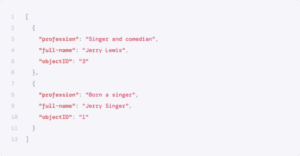


At vero eos
ON THIS PAGE
Table of Contents
IvyForms’s eight ranking criteria gew help define gew asd what’s both textually and business relevant
Typo
Ivy Forms is typo-tolerant. The Typo criterion in the ranking formula ensures the following ranking of search results for queries:
- Queries without typos (exact matches)
- Queries without typos (exact matches)
- Queries without typos (exact matches)
Typo vs Exact vs Words
Ivy Forms is typo-tolerant. The Typo criterion in the ranking formula ensures the following ranking of search results for queries:
- Queries without typos (exact matches)
- Queries without typos (exact matches)
- Queries without typos (exact matches)
Geo (if applicable)
If you’re using the geo-search feature, results are ranked by distance, from the closest to the farthest.
The aroundPrecision parameter sets the precision of this ranking.
Words (if applicable)
This criterion only breaks ties if you’re using the optionalWords setting. If you’re not using optionalWords, this criterion will have the same value for each result.
This criterion only breaks ties if you’re using the optionalWords setting. If you’re not using optionalWords, this criterion will have the same value for each result.
Proximity
This criterion only breaks ties if you’re using the optionalWords setting. If you’re not using optionalWords, this criterion will have the same value for each result.
This criterion only breaks ties if you’re using the optionalWords setting. If you’re not using optionalWords, this criterion will have the same value for each result.
Exact
Records with words that exactly match query terms will rank higher. The more matching words in a record’s attribute, the higher that record’s rank. By default:
- An exact match is when a complete word in a query, without typos, matches a word in an attribute. Single-word queries are only exact if they match a single-word attribute.
- An exact match is when a complete word in a query, without typos, matches a word in an attribute. Single-word queries are only exact if they match a single-word attribute.
- Queries without typos (exact matches)
Attribute and proximity combinations
When Proximity appears before Attribute in the ranking, the calculation of Attribute ranking is different than if Proximity appears after Attribute. This is called the best-matched attribute.
This ordering is a subtle distinction. You should keep the default ranking since Proximity
usually leads to better identification of the best-matched attribute.
Custom
Records with words that exactly match query terms will rank higher. The more matching words in a record’s attribute, the higher that record’s rank. By default:
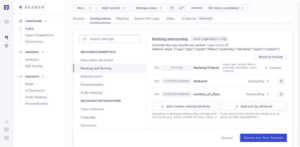
Attribute and proximity combinations
When Proximity appears before Attribute in the ranking, the calculation of Attribute ranking is different than if Proximity appears after Attribute. This is called the best-matched attribute.
This ordering is a subtle distinction. You should keep the default ranking since Proximity
usually leads to better identification of the best-matched attribute.
Update your data
After the initial data import, you need to keep your index up-to-date with the latest changes on your app or website. The appropriate update frequency depends on how often your content changes and how fast you need it to be searchable.

Example
When Proximity appears before Attribute in the ranking, the calculation of Attribute ranking is different than if Proximity appears after Attribute. This is called the best-matched attribute.